


RECLAIM
Reclaim - Your Intelligent iPhone Cleaner
Reclaim uses on-device AI to scan your entire photo library, find what is quietly eating your iPhone storage, and clear it but only after you approve every deletion. Apple's Vision framework runs all machine-learning models directly on your phone, matching duplicate and near-duplicate photos by visual similarity, detecting blurry shots, recognising empty scenes, and surfacing screenshots and chat images. Because every scan runs on-device, your photos never leave your iPhone. Reclaim also cleans documents from folders you select in the Files app, and every number it shows you is the actual space you will get back not an estimate.
Products Available
To Download & Use
Avg. User Rating
iPhone Storage Warnings Shouldn't Require You to Do the Work
Most people know their iPhone is full. What they do not know is exactly what is filling it. The standard approach scrolling through thousands of photos manually, guessing which ones are duplicates, trying to remember which screenshots you still need is slow, unreliable, and mentally exhausting. You delete a few things, free up a few hundred megabytes, and a week later the storage warning is back.
Existing cleaner apps either scan photos on a remote server (which means your personal images leave your device), show you inflated storage numbers that never match what you actually recover, or delete files automatically without giving you a chance to review what goes. None of these are acceptable trade-offs when the files involved are your memories, your documents, and your personal data.
Reclaim solves this differently. On-device AI powered by Apple's own Vision framework analyses your photo library and your Files folders without sending anything to an external server. It shows you exactly what it found, exactly how much space each category will recover, and waits for your approval before a single file is deleted. The number you see before you tap is the number you get after.
POWERFUL FEATURES
Find it, review it, approve it, reclaim it — with no files leaving your device at any point.
Apple's Vision framework runs machine-learning models directly on your iPhone, with no internet connection required and no photos uploaded to any server. Your library is analysed entirely on-device, which means your personal photos stay personal always.
Reclaim matches photos by visual similarity, not just identical file hashes. It catches the burst sequences where you took twelve shots to get one good one, the near-identical landscape photos from the same spot, and the accidental doubles you did not even notice you had and groups them so you can keep the best and clear the rest.
The on-device model evaluates image sharpness across your entire library and flags photos that are too blurry to be worth keeping. You review each flagged photo before it is deleted. Reclaim never removes anything without your explicit approval.
Photos of empty rooms, accidental shots of the floor, scenery with no subjects, Reclaim's scene recognition surfaces these so you can decide which ones to clear. The AI identifies images with no people in them and groups them separately so you can review quickly.
Screenshots accumulate faster than almost any other category, and they are rarely needed after the first few days. Reclaim surfaces screenshots and images received in chat apps as a distinct group, making it easy to clear the clutter without touching your camera roll memories.
Reclaim extends beyond your photo library into the Files app. Select the folders you want to clean, and Reclaim scans for duplicate documents, old downloads, and files you no longer need showing you exactly how much space each folder is consuming and what you will recover.
Every number Reclaim shows you per category, per photo group, per folder is the actual space you get back after deletion, not a system estimate that shrinks when you check your settings afterward. What it shows is what you recover.
Reclaim never deletes anything automatically. Every suggested deletion is presented for your review, and nothing is removed until you confirm it. You stay in control of every file on your device at every step of the process.
WHO IS THIS FOR
Reclaim is built for anyone whose iPhone storage keeps filling up and who wants a smarter, safer way to clear it than scrolling through thousands of photos manually.
If you shoot bursts, try multiple angles, or come home from any trip with hundreds of near-identical photos, Reclaim's visual similarity detection groups them so you can keep the best shot from each sequence without reviewing every frame individually."
Frequent travellers add their home city and destinations to track local times at each stop - particularly useful when a single trip crosses three or more time zones and every layover needs to be mentally converted.
Family photo libraries grow fast, and a significant percentage of every library is blurry shots, accidental captures, and duplicates from burst mode. Reclaim finds what is worth deleting and leaves the decision with you — protecting every memory while clearing the clutter around it.
Screenshots of notes, lecture slides, assignment instructions, and random images accumulate across a semester. Reclaim groups screenshots separately so clearing them is a one-session task rather than a semester-long manual scroll.
Travel generates the highest duplicate-photo density of any use case the same view photographed repeatedly, burst sequences on moving subjects, accidental shots. Reclaim's near-duplicate detection is particularly valuable for clearing post-trip library bloat.
If you have ever hesitated to use a photo cleaner because you do not want your images uploaded to an external server, Reclaim is built specifically for you. Every scan runs on-device using Apple's Vision framework. Nothing leaves your iPhone.
SIMPLE PROCESS
No manual scrolling, no guesswork, no automatic deletions just scan, review, and reclaim.
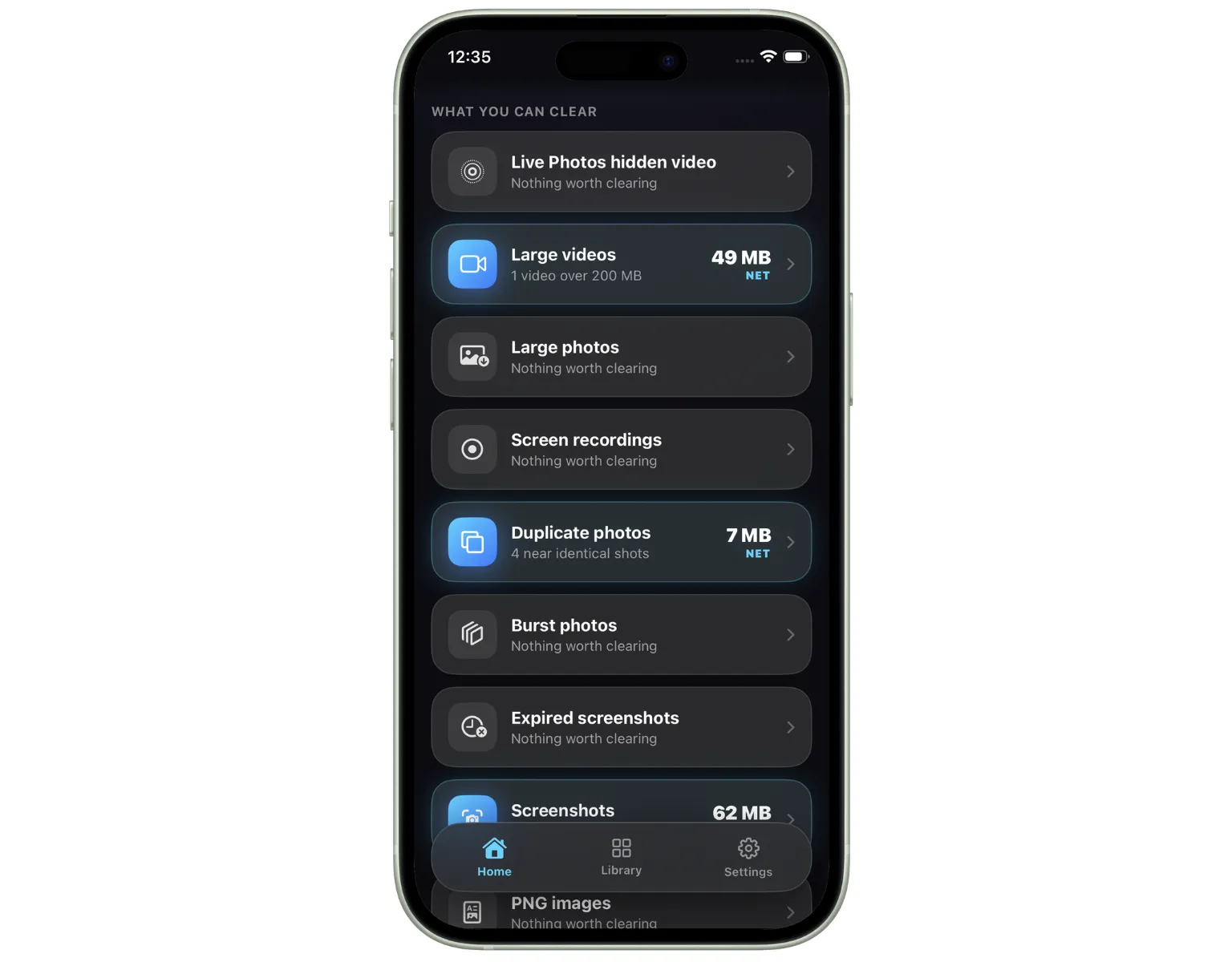
Open Reclaim and tap to start a scan. Apple's Vision framework analyses your entire photo library and your selected Files folders on-device no internet required. Within seconds, Reclaim has categorised everything: duplicates, near-duplicates, blurry shots, empty scenes, screenshots, and documents. It shows you exactly how much space each category contains.
Browse through each category at your own pace. Reclaim presents the photos and files it has identified for removal, showing you what it found and why. You decide what to keep and what to clear nothing is pre-selected for deletion. Every item stays on your device until you explicitly choose to remove it.
Confirm the items you want to delete and Reclaim removes them. The space recovered matches exactly what was shown before you tapped no discrepancy between the estimate and the actual recovery. Your storage is free, your memories are intact, and your data never left your phone.
PLATFORM PREVIEW
A quick look at Reclaim from the initial scan results to reviewing duplicates and confirming deletions.
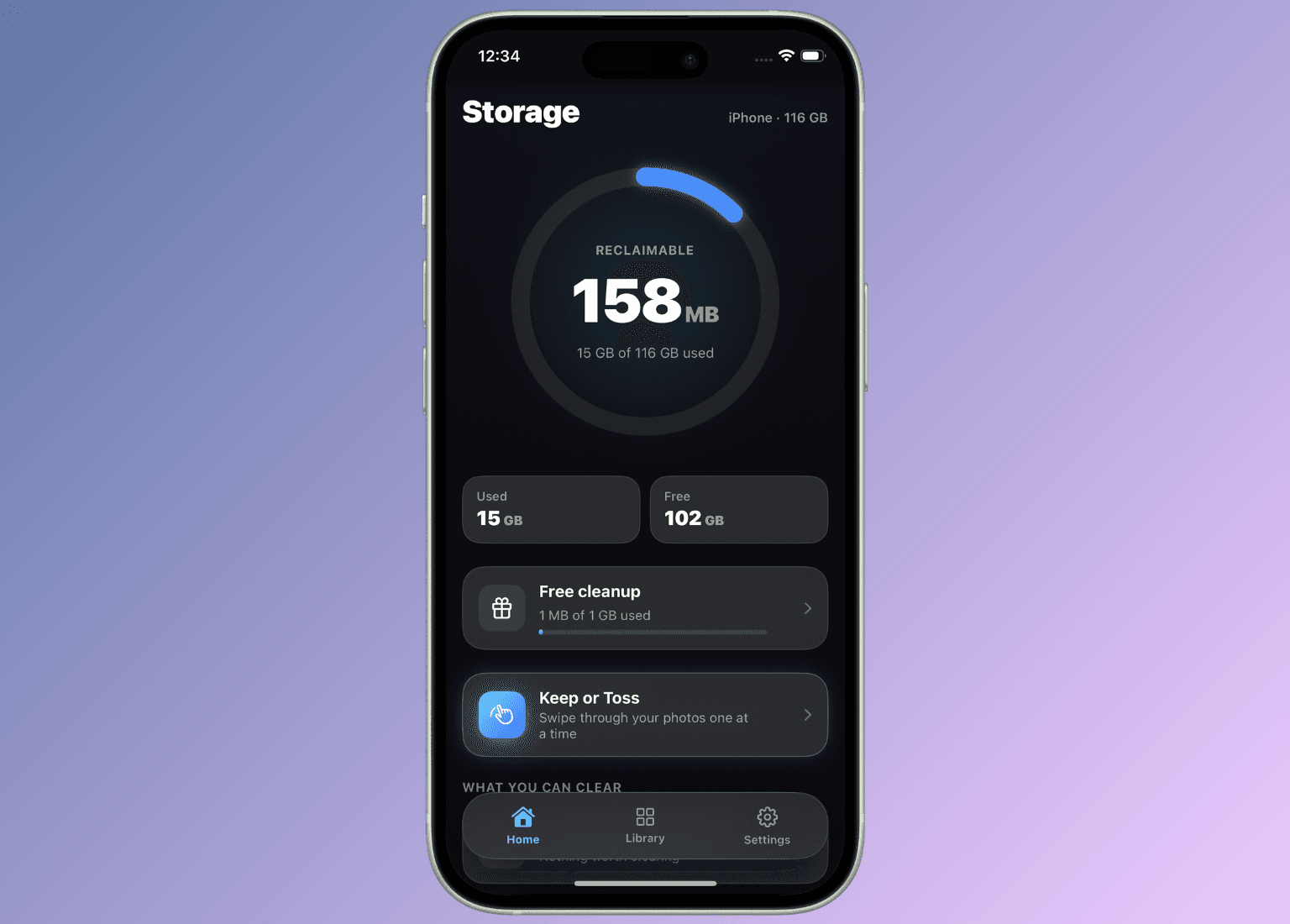
See exactly how much space each category is using before you delete anything.
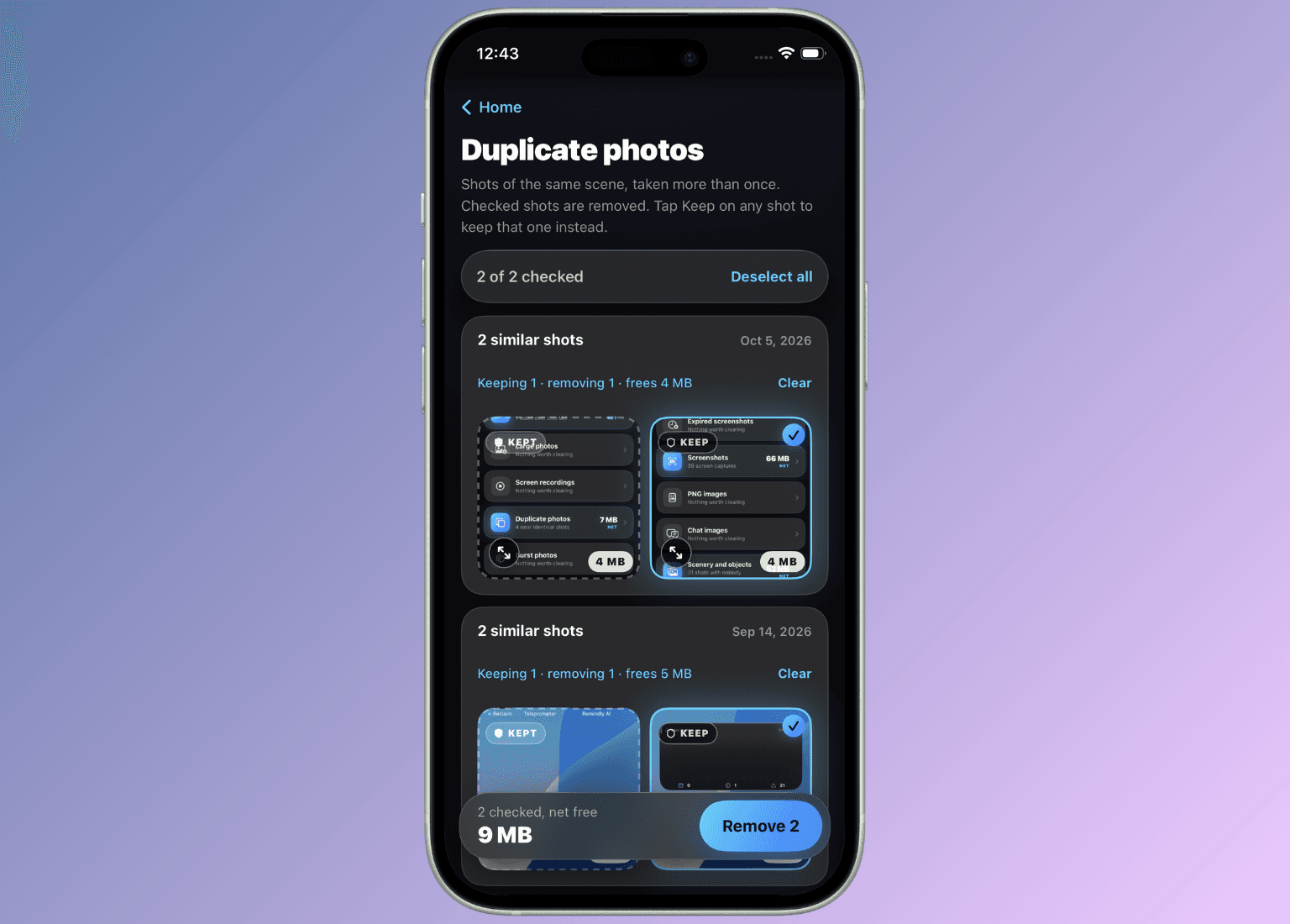
Visual side-by-side comparison of near-duplicate photos so you keep the best shot.
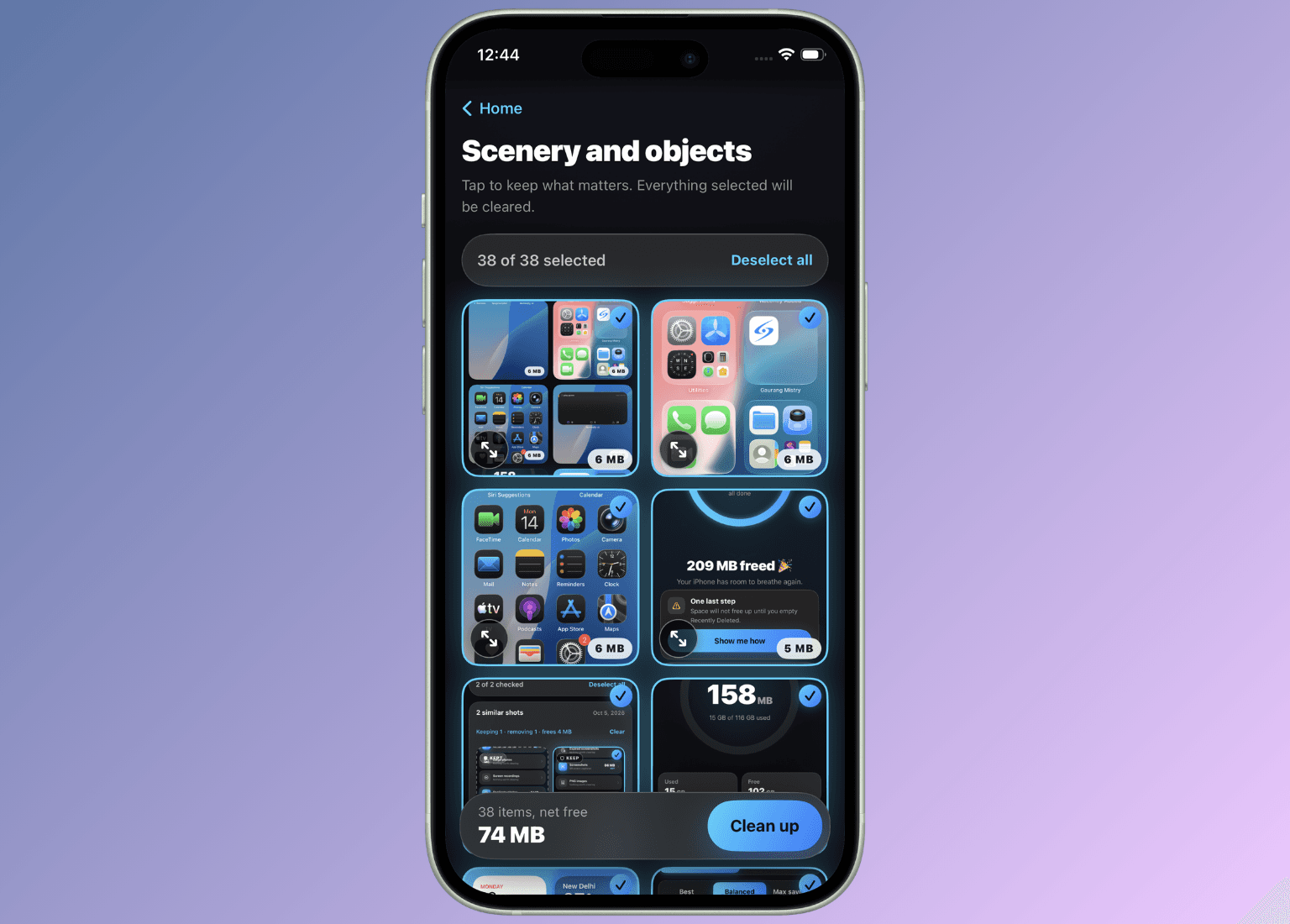
The actual space recovered matches the figure shown always.
BENEFITS
Here is why Reclaim is different from every other cleaner app you have tried and given up on.
01
Stop getting interrupted by storage warnings at the worst moment mid-photo, mid-download, mid-update. Reclaim clears the categories filling your storage fastest, giving you meaningful space back rather than a few megabytes at a time.
02
Other apps show estimated storage recovery numbers that do not match what you actually get back. Reclaim calculates actual file sizes and shows you the real number before you delete anything — so what you see is what you reclaim.
03
On-device AI means no uploads, no cloud processing, no external servers. Every scan runs entirely on your iPhone using Apple's Vision framework. Your photos, documents, and personal files stay private throughout the entire process.
04
Reclaim never deletes anything automatically. Every photo, screenshot, document, and file is presented for your review before removal. You confirm what goes nothing disappears without your explicit approval.
05
Most iPhone cleaners only scan your photo library. Reclaim also cleans documents and files in the folders you select from the Files app, giving you a complete picture of what is using your iPhone storage — and a single place to clear all of it.
06
Reclaim is designed to show you exactly what you need and nothing you do not. No confusing dashboards, no subscription upsells interrupting your cleanup session, no misleading storage scores. Scan, review, delete, done.
FAQ
Reclaim is an iPhone cleaner app built by Saturncube Technologies that uses on-device AI — powered by Apple's Vision framework — to scan your photo library and Files folders, identify what is wasting your storage, and let you delete it with your approval. All processing happens on your device. Your photos are never uploaded anywhere.
GET STARTED
Download Reclaim, run one scan, and see exactly what is filling your iPhone storage — before you delete a single thing. Every scan is on-device. Every deletion is your choice.
Receive updates, insights, and useful tech information directly in your email.